animated_chat_record_button 0.0.4
A beautiful and fully customizable WhatsApp-like animated recording button for Flutter applications. This package provides a smooth user experience with animated transitions, voice recording capabilities, and text input functionality.
Animated Chat Record Button
A beautiful and fully customizable WhatsApp-like animated recording button for Flutter applications. This package provides a smooth user experience with animated transitions, voice recording capabilities, and text input functionality.
Demo
Quick Preview (GIF)
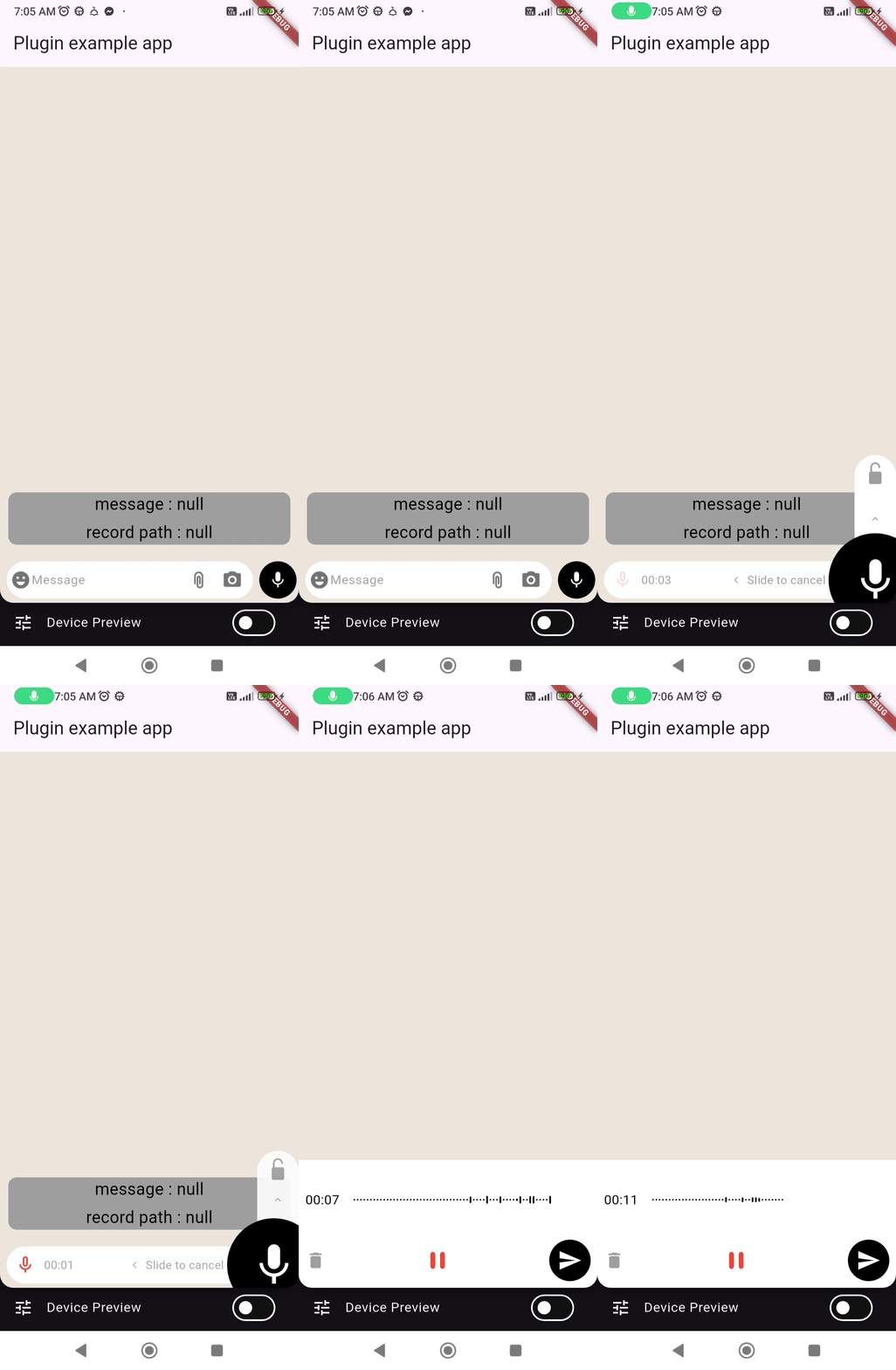
Full Demo Video
Features
✨ WhatsApp-like Interface: Familiar chat interface with recording and text input 🎙️ Voice Recording: High-quality audio recording with customizable output path 🎨 Fully Customizable: Extensive theming and styling options 🔒 Lock to Record: Lock recording for hands-free operation ❌ Slide to Cancel: Intuitive gesture to cancel recording 📝 Text Input: Seamless switching between text and voice input 🎭 Smooth Animations: Fluid transitions and micro-interactions 🎯 Easy Integration: Simple to implement with minimal setup
Installation
Add this to your package's pubspec.yaml file:
dependencies:
  animated_chat_record_button: ^latest_version
Then run:
$ flutter pub get
Basic Usage
import 'dart:developer';

import 'package:device_preview/device_preview.dart';
import 'package:flutter/material.dart';

import 'package:animated_chat_record_button/animated_chat_record_button.dart';

void main() {
  runApp(DevicePreview(
    enabled: true,
    builder: (context) => const MyApp(),
  ));
}

class MyApp extends StatefulWidget {
  const MyApp({super.key});

  @override
  State<MyApp> createState() => _MyAppState();
}

class _MyAppState extends State<MyApp> {
  String? filePathW;
  String? message;
  bool isRecording = false;
  TextEditingController textEditingController = TextEditingController();
  @override
  Widget build(BuildContext context) {
    final double screenHight = MediaQuery.of(context).size.height;

    return MaterialApp(
      home: Scaffold(
        backgroundColor: Color(0xffeee5dc),
        appBar: AppBar(
          title: const Text('Plugin example app'),
        ),
        body: Stack(
          children: [
            Positioned(
              top: 20,
              left: 0,
              right: 0,
              bottom: 70,
              child: SingleChildScrollView(
                scrollDirection: Axis.vertical,
                reverse: true,
                physics: AlwaysScrollableScrollPhysics(),
                child: Column(
                  spacing: 5,
                  children: [
                    Padding(
                      padding: EdgeInsets.symmetric(horizontal: 10),
                      child: Container(
                        decoration: BoxDecoration(
                          borderRadius: BorderRadius.circular(10),
                          color: Colors.grey[500],
                        ),
                        width: MediaQuery.of(context).size.width,
                        child: Center(
                          child: Column(
                            spacing: 5,
                            children: [
                              Text(
                                'message : $message',
                                style: const TextStyle(
                                    fontSize: 20, color: Colors.black),
                              ),
                              Text(
                                'record path : $filePathW',
                                style: const TextStyle(
                                    fontSize: 20, color: Colors.black),
                              ),
                            ],
                          ),
                        ),
                      ),
                    ),
                  ],
                ),
              ),
            ),
            AnimatedChatRecordButton(
              config: RecordButtonConfig(
                recordButtonSize: 45,
              ),
              onPressEmoji: () {
                log('Emoji button pressed');
              },
              onPressCamera: () {
                log('Camera button pressed');
              },
              onPressAttachment: () {
                log('Attachment button pressed');
              },
              onSend: (text) {
                setState(() {
                  message = text;
                  log('Message sent: $message');
                });
              },
              onLockedRecording: (doesLocked) {
                log('Locked recording: $doesLocked');
                setState(() {
                  isRecording = doesLocked;
                });
              },
              textEditingController: textEditingController,
              onRecordingEnd: (filePath) {
                setState(() {
                  filePathW = filePath?.path;
                  log('from plugin test ${filePathW.toString()}');
                });
              },
            ),
          ],
        ),
      ),
    );
  }
}
Advanced Configuration
Customizing Appearance
AnimatedChatRecordButton(
  config: RecordButtonConfig(
    // Container styling
    slideUpContainerHeight: 200.0,
    slideUpContainerColor: Colors.grey[200],
    slideUpContainerWidth: 60.0,

    // Button styling
    firstRecordButtonColor: Colors.blue,
    secondRecordButtonColor: Colors.green,
    recordButtonSize: 50.0,
    recordButtonScaleVal: 2.0,

    // Text field styling
    textFormFieldBoxFillColor: Colors.white,
    textFormFieldHint: "Type a message...",
    textFormFieldStyle: TextStyle(fontSize: 16),
    textFormFieldHintStyle: TextStyle(color: Colors.grey),

    // Icons
    firstRecordingButtonIcon: Icon(Icons.mic, color: Colors.white),
    secondRecordingButtonIcon: Icon(Icons.send, color: Colors.white),

    // Padding
    containersPadding: EdgeInsets.symmetric(horizontal: 12),
  ),

  // Recording configuration
  recordingContainerConfig: RecordingContainerConfig(
    // Add your recording container config here
  ),

  // Callbacks
  onRecordingEnd: (File? audioFile) {
    // Handle recording completion
  },

  onSend: (String text) {
    // Handle text message
  },

  onStartRecording: (bool started) {
    print("Recording started: $started");
  },

  onLockedRecording: (bool locked) {
    print("Recording locked: $locked");
  },

  // Additional button callbacks
  onPressCamera: () {
    // Handle camera button press
  },

  onPressAttachment: () {
    // Handle attachment button press
  },

  onPressEmoji: () {
    // Handle emoji button press
  },

  // Positioning
  bottomPosition: 10.0,

  // Colors
  textFormButtonsColor: Colors.grey[600],
  arrowColor: Colors.grey,
  lockColorFirst: Colors.grey,
  lockColorSecond: Colors.black,

  // Custom recording path
  recordingOutputPath: "/your/custom/path/recording.aac",
)
Recording Container Configuration
RecordingContainerConfig(
  // Add your specific recording container configurations
  // This allows you to customize waveforms, recording UI, etc.
)
Configuration Options
RecordButtonConfig Properties
| Property | Type | Default | Description |
|---|---|---|---|
slideUpContainerHeight | double? | 150 | Height of the slide-up container |
slideUpContainerColor | Color? | null | Background color of slide-up container |
slideUpContainerWidth | double | 50 | Width of the slide-up container |
firstRecordButtonColor | Color? | null | Color of the record button |
secondRecordButtonColor | Color? | null | Color of the send button |
recordButtonSize | double | 40 | Size of the record button |
recordButtonScaleVal | double | 2.5 | Scale animation value (1.5-2.5) |
textFormFieldBoxFillColor | Color? | null | Background color of text field |
textFormFieldHint | String? | null | Placeholder text for input field |
textFormFieldStyle | TextStyle? | null | Text style for input field |
textFormFieldHintStyle | TextStyle? | null | Hint text style |
containersPadding | EdgeInsetsGeometry | EdgeInsets.only(left: 8) | Padding around containers |
firstRecordingButtonIcon | Icon | Icons.mic | Icon for record button |
secondRecordingButtonIcon | Icon | Icons.send_rounded | Icon for send button |
Callback Functions
| Callback | Parameters | Description |
|---|---|---|
onRecordingEnd | File? filePath | Called when recording ends with file path |
onSend | String text | Called when send button is pressed with text |
onStartRecording | bool doesStart | Optional callback when recording starts |
onLockedRecording | bool doesLocked | Optional callback when recording is locked |
onPressCamera | void | Optional callback for camera button |
onPressAttachment | void | Optional callback for attachment button |
onPressEmoji | void | Optional callback for emoji button |
Permissions
Android
Add these permissions to your android/app/src/main/AndroidManifest.xml:
<uses-permission android:name="android.permission.RECORD_AUDIO" />
<uses-permission android:name="android.permission.WRITE_EXTERNAL_STORAGE" />
<uses-permission android:name="android.permission.READ_EXTERNAL_STORAGE" />
iOS
Add these to your ios/Runner/Info.plist:
<key>NSMicrophoneUsageDescription</key>
<string>This app needs access to microphone to record audio messages</string>
How It Works
- Text Mode: When the text field has content, shows a send button
- Record Mode: When text field is empty, shows a microphone button
- Recording States:
- Tap & Hold: Start recording with visual feedback
- Slide Up: Lock recording for hands-free operation
- Slide Left: Cancel recording with slide-to-cancel gesture
- Release: Complete and save recording
Gestures
- 🎙️ Tap & Hold: Start recording
- ⬆️ Slide Up: Lock recording mode
- ⬅️ Slide Left: Cancel recording
- ✋ Release: Complete recording
- 📝 Type: Automatically switches to send mode
File Output
Recordings are saved in AAC format by default. You can customize the output path using the recordingOutputPath parameter.
Default path format: /storage/emulated/0/Android/data/your.package.name/files/recording_[timestamp].aac
Requirements
- Flutter SDK: >=2.12.0
- Dart: >=2.12.0
- Android: API level 21+
- iOS: 9.0+
- minSDK : 24
Contributing
Contributions are welcome! Please feel free to submit a Pull Request.
License
This project is licensed under the MIT License - see the LICENSE file for details.
Support
If you like this package, please give it a ⭐ on GitHub and consider supporting the developer.
👍 Like the content if it helped you 🔄 Share it with other Flutter developers 💬 Follow me for more Flutter packages and tutorials Your support means a lot and helps me create more awesome Flutter packages! 🚀
Changelog
See CHANGELOG.md for a detailed changelog.
Made with ❤️ for the Flutter community