app_bar_with_search_switch 1.8.6
An extension for AppBar which can switch it into search field.
AppBar with search switch
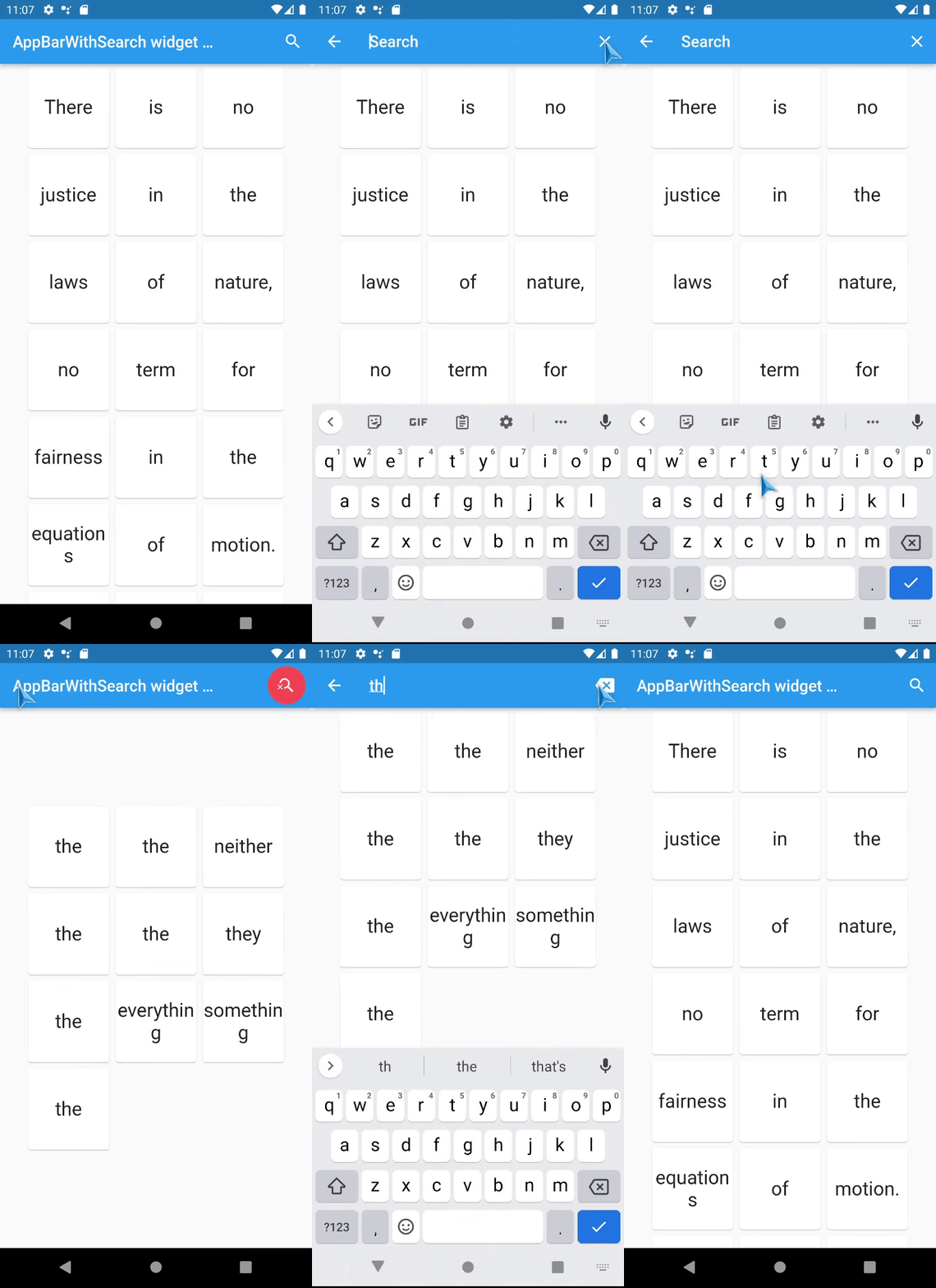
Content
Intro
An AppBar that can switch into search field.
The AppBarWithSearchSwitch is a replacement class for AppBar, essentially, it returns two different app bars based on whether search is active.
Note: version 1.5+ is lightweight version of this package, version 2.0+ uses SpeechToText package for speech recognition.
This is complete rewrite of flutter_search_bar with support of these features:
Features
- support Stateless widgets!,
- work with ValueNotifier inside, which can be used directly or can easily work with any providers,
- full customization,
- it works in place(no Navigation shenanigans),
- don't need additional variables somewhere,
- support custom animation (and have nice prebuilt animations: AppBarAnimationSlideDown and AppBarAnimationSlideLeft ) (new in v1.5+),
- Also, there are a few helpers(optional):
- AppBarSearchButton,
- AppBarOnEditListener,
- AppBarOnSubmitListener,
- AppBarWithSearchFinder,
- AppBarSpeechButton ( in version 2.0+ only )
Quick overview
Use appBarBuilder parameter to build default AppBar with:
- a search button which will call startSearch
- or with standard search button AppBarSearchButton.
The appBarBuilder is the only required parameter, all other parameters are optional!
Use one of these callbacks to get text from TextField:
- onChanged,
- onSubmitted,
- or listen to textEditingController,
- or just ValueNotifier: textNotifier ...
Also, there are callbacks for:
This widget support almost all properties of AppBar, but:
-
leading and title properties are now expect -
Widget Function(context)?:- this is made in order to access
AppBarWithSearchSwitch.of(context)methods in them, - don't change them unless it necessary and use templates if you need to change these properties.
- this is made in order to access
-
preferredSize here is a method, you should set it via toolbarWidth and toolbarHeight.
Here is a list of all other new properties(without mentioned above) with their default values:
- this.tooltipForClearButton = 'Clear',
- this.tooltipForCloseButton = 'Close search',
- this.fieldHintText = 'Search',
- this.closeSearchIcon = Icons.close,
- this.clearSearchIcon = Icons.backspace,
- this.keepAppBarColors = true,
- this.closeOnSubmit = true,
- this.clearOnSubmit = false,
- this.clearOnClose = false,
- this.showClearButton = true,
- this.closeOnClearTwice = true,
- this.submitOnClearTwice = true,
- this.keyboardType = TextInputType.text,
- this.toolbarWidth = double.infinity,
- // Style
- this.searchInputDecoration,
- this.theme,
- this.titleTextStyle,
- this.animation - (new in 1.5+),
- // And optional ValueNotifier s (can be used to control state of AppBarWithSearchSwitch):
- this.customIsSearchModeNotifier,
- this.customTextNotifier,
- // And optional ValueNotifier s (read only):
- this.customHasText,
- this.customSubmitNotifier,
- // And optional TextEditingController:
- this.customTextEditingController,
Examples
Online example here: https://alexqwesa.github.io/app_bar_with_search_switch/.
Full example of Stateful widget is here: https://pub.dev/packages/app_bar_with_search_switch/example.
Full example of Stateless widget is here: (github).
Full example of Stateless widget with 10000 elements searched in place and with search button outside of app bar is here: (github).
Full example of Stateless widget there android back button will close search is here: (github).
And the fragment of example code is here:
  //...
  @override
  Widget build(BuildContext context) {
    return Scaffold(
      //
      // *** The Widget AppBarWithSearchSwitch
      //
      appBar: AppBarWithSearchSwitch(
        onChanged: (text) {
          // update you provider here
          // searchText.value = text;
        }, // onSubmitted: (text) => searchText.value = text,
        appBarBuilder: (context) {
          return AppBar(
            title: Text('Example '),
            actions: [
              AppBarSearchButton(),
              // or
              // IconButton(onPressed: AppBarWithSearchSwitch.of(context)?startSearch, icon: Icon(Icons.search)),
            ],
          );
        },
      ),
      // search in body by any way you want, example:
      body: AppBarOnEditListener(builder: (context) { return /* your code here */ ;} ),
    );
  }
Screenshots
TODO
- Add speech to text support - done in version 2.0+,
- Animation for Search app bar activation - done in versions 1.5+
- don't use shared default ValueNotifier and TextEditingController ?
FAQ
How to activate search field (isSearchMode=true)
of AppBarWithSearchSwitch
from somewhere far away?
-
If it is inside the same Scaffold or its children, then:
- use AppBarWithSearchFinder,
- call
AppBarWithSearchFinder.of(context)?.triggerSearch()inside.
-
If it is outside of Scaffold, use customIsSearchModeNotifier,
- Initialise variable of type ValueNotifier
somewhere up in the widget tree, - Set customIsSearchModeNotifier property of AppBarWithSearchSwitch with this variable,
- Set value of this ValueNotifier to true to show Search AppBar,
- (Note: currently, if you stop search via this variable(by setting it false),
clearOnClosewill not work, and callBackonClosewill not be called), so useGlobalKeyif you need them.
- Initialise variable of type ValueNotifier
How to make android back button close search? (instead of going to previous screen or exit app)
- Initialise variable searchText and isSearchMode of type ValueNotifier somewhere up in the widget tree,
- Assign these variables to customIsSearchModeNotifier, customTextNotifier,
- Wrap WillPopScope widget over Scaffold,
and define parameter
onWillPopas in example below:
... // inside a widget
  final isSearchMode = ValueNotifier<bool>(false);
  final searchText = ValueNotifier<String>('');

  @override
  Widget build(BuildContext context) {

    return WillPopScope(
      onWillPop: () async { // android back button handler
        if (searchText.value != '') {
          isSearchMode.value = false;
          searchText.value = '';
          return false;
        }
        return true;
      },
      child: Scaffold(
        //
        // *** The Widget AppBarWithSearchSwitch
        //
        appBar: AppBarWithSearchSwitch(
          customIsSearchModeNotifier: isSearchMode,
          customTextNotifier: searchText,
          appBarBuilder: (context) {
            return AppBar(
... // you code here
How to add autocompletion to search field?
- Use Autocomplete widget in title parameter:
... // inside a widget
  @override
  Widget build(BuildContext context) {

    return Scaffold(
        appBar: AppBarWithSearchSwitch(
          title:  (context) {
                return Autocomplete<String>(
                  optionsBuilder: (TextEditingValue textEditingValue) {
                    // your code here
                  },
                );
          }
          appBarBuilder: (context) {
            return AppBar(
... // you code here
Can it be used with old flutter sdk versions?
The release 1.3.5 is a special release with support of old flutter sdk, it tested with flutter 2.10.0
Known issues
- FIXED UPSTREAM
keepAppBarColors = truedidn't change color of 'Text Selection Handles' (selection bubbles), this is because of upstream issue https://github.com/flutter/flutter/issues/74890 with textSelectionTheme:selectionHandleColor - If for some reason you use more than one AppBarWithSearchSwitch on the same page (how? and why?) provide them with their own: customIsSearchModeNotifier, customTextNotifier, customTextEditingController, customHasText...