country_picker_enterprise 1.1.1
Enterprise-grade country picker widget for Flutter with multi-language support, phone codes, smart search functionality, and auto country detection.
Country Picker Enterprise
⚠️ DEPRECATED: This package is no longer maintained. Please use country_search instead.
Why the change? The new country_search package provides:
- 🚀 4.7x faster search performance (~110 microseconds per query)
- 🌐 10 languages (vs 8 in this package)
- ⚡ Lightweight components instead of heavy Material widgets
- 📱 Weak device optimization for smooth performance on low-end devices
- 🎨 Better UI/UX with modern design patterns
- 🔧 Active development and regular updates
Migration is easy - the API is very similar. Just replace country_picker_enterprise with country_search in your pubspec.yaml and update your imports.
Enterprise-grade country picker widget for Flutter with multi-language support, phone codes, and automatic country detection.
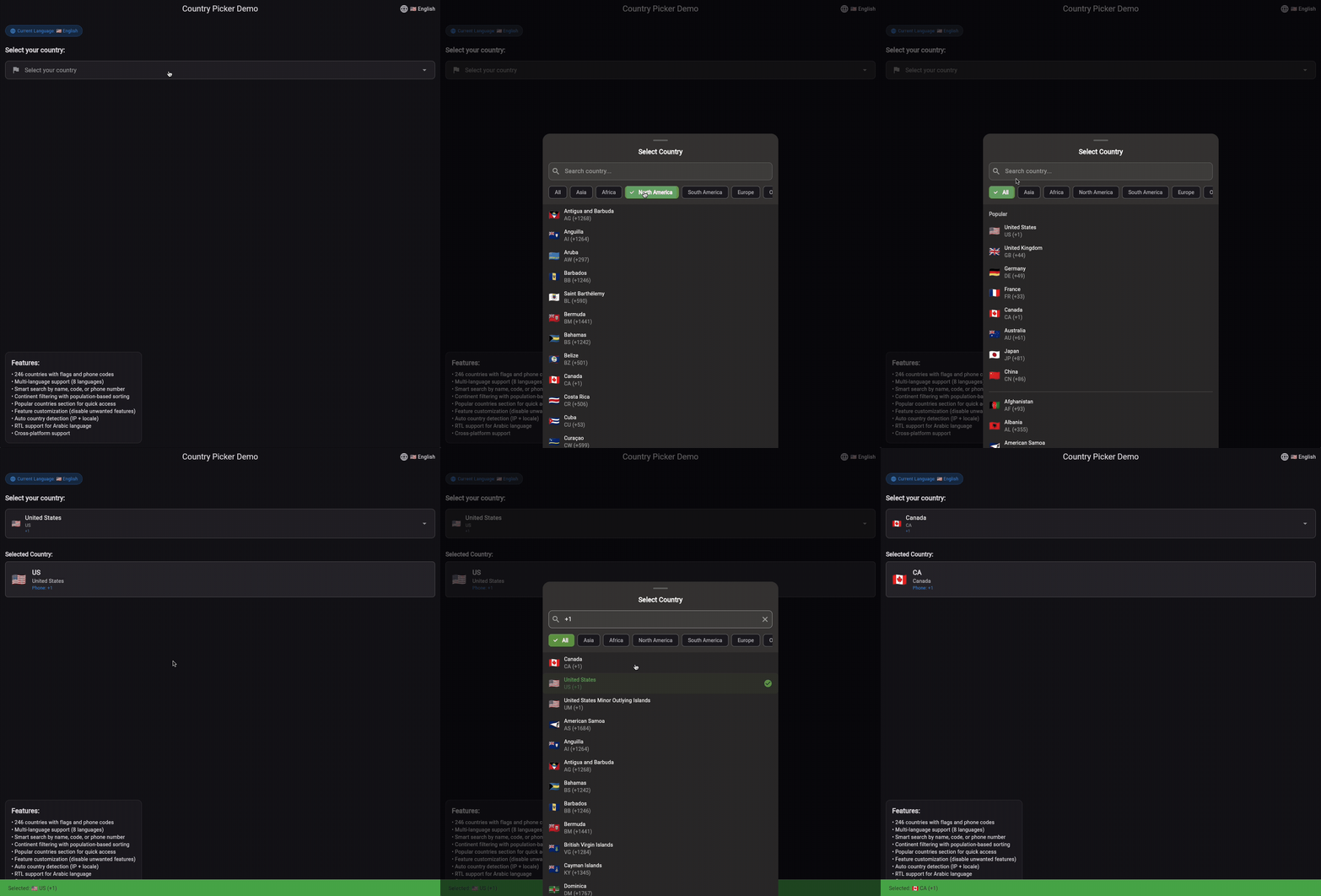
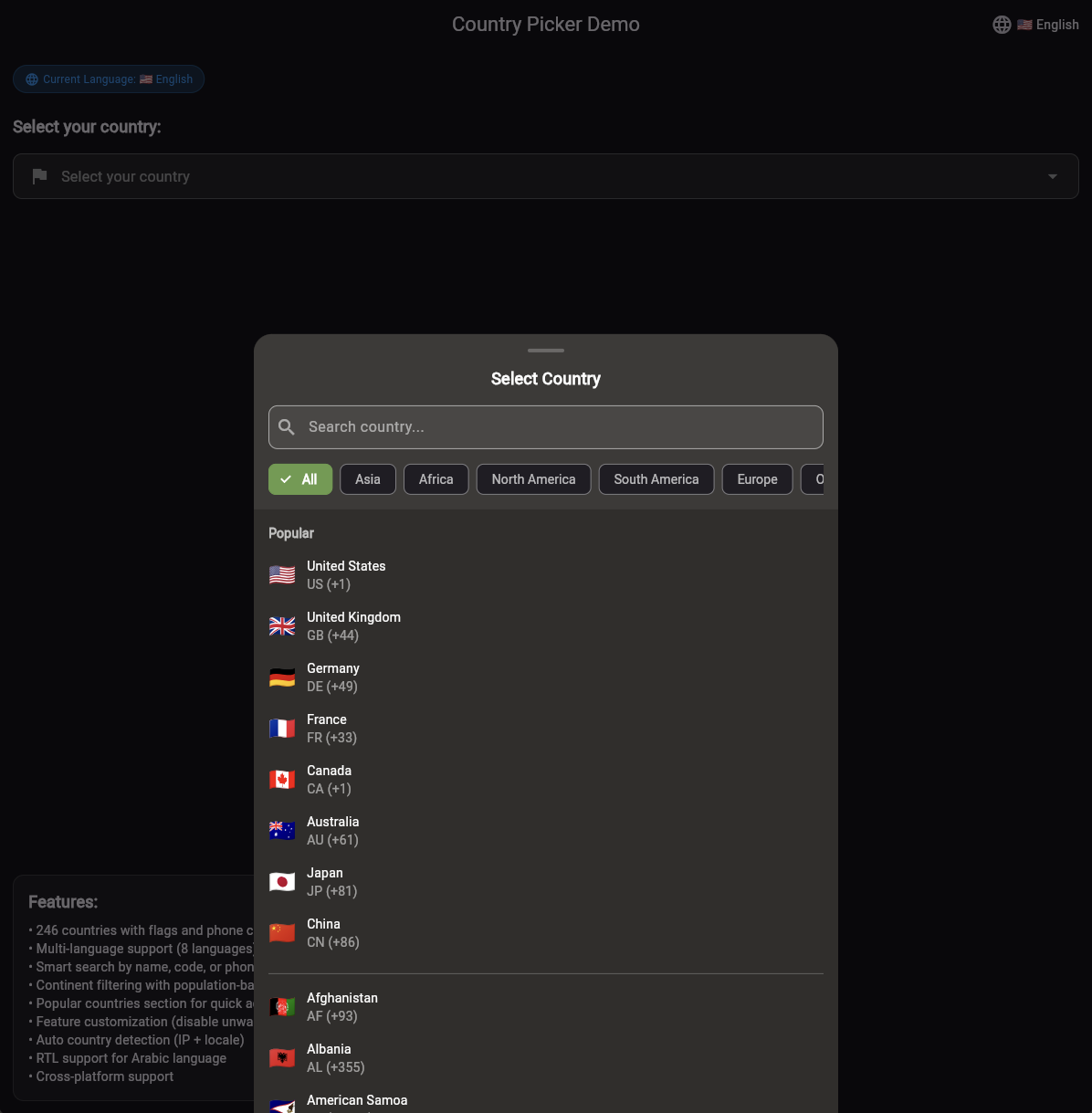
✨ Features
- 🌍 246 Countries with flags, ISO codes, and phone codes
- 🌐 Multi-language Support - English, Spanish, French, German, Portuguese, Russian, Chinese, Arabic with RTL support
- 🔍 Smart Search by country name, code, or phone code
- 📞 Phone Codes - Complete international dialing codes
- 🌎 Continent Filtering - Filter countries by continent (North America, South America, Europe, Asia, Africa, Oceania, Antarctica)
- ⭐ Popular Countries - Quick access to 8 most popular countries in "All" section
- 🎯 Auto Country Detection - Automatically detect user's country by IP or locale
- 🎨 Adaptive Design for mobile, tablet and desktop
- ⚡ Lightweight - only Flutter SDK
- 🔧 Highly Customizable - easily disable unwanted features
- 🌐 Cross-Platform - works on mobile, web, and desktop
- ⚡ High Performance - cached data, lazy loading, optimized search
📊 Comparison with Other Libraries
| Feature | country_picker_enterprise | flutter_country_picker | country_picker | country_selector |
|---|---|---|---|---|
| Countries | 246 | 195 | 195 | 195 |
| Languages | 8 (EN, ES, FR, DE, PT, RU, ZH, AR) | 1 (EN only) | 1 (EN only) | 1 (EN only) |
| Phone Codes | ✅ Complete | ✅ Complete | ✅ Complete | ✅ Complete |
| Flags | ✅ Emoji flags | ✅ Emoji flags | ✅ Emoji flags | ✅ Emoji flags |
| Search | ✅ Smart search | ✅ Basic search | ✅ Basic search | ✅ Basic search |
| Continent Filter | ✅ 7 continents | ❌ | ❌ | ❌ |
| Popular Countries | ✅ 8 popular countries | ❌ | ❌ | ❌ |
| Auto Detection | ✅ IP + Locale | ❌ | ❌ | ❌ |
| Performance | ✅ Cached data, lazy loading | ❌ | ❌ | ❌ |
| Customization | ✅ High (disable features) | ⚠️ Medium | ⚠️ Medium | ⚠️ Medium |
| UI Design | ✅ Modern & Adaptive | ⚠️ Basic | ⚠️ Basic | ⚠️ Basic |
| Dependencies | Only Flutter SDK | Only Flutter SDK | Only Flutter SDK | Only Flutter SDK |
| Size | ⚡ Lightweight | ⚡ Lightweight | ⚡ Lightweight | ⚡ Lightweight |
| Active Development | ✅ Yes | ⚠️ Limited | ⚠️ Limited | ⚠️ Limited |
Why choose country_picker_enterprise?
- 🌍 Most Complete: 246 countries vs 195 in others
- 🌐 Multi-Language: 8 languages vs 1 in others (with full RTL support)
- ⭐ Popular Countries: Quick access to 8 most popular countries
- 🔍 Smart Features: Continent filtering, auto-detection, optimized search
- ⚡ High Performance: Cached data, lazy loading, O(1) lookups
- 🎨 Modern UI: Adaptive design for all devices
- 🚀 Simple API: Works out of the box with sensible defaults
- 🔧 Highly Customizable: Disable any feature you don't need
📦 Installation
dependencies:
  country_picker_enterprise: ^1.0.0
🚀 Usage
Basic Usage
import 'package:country_picker_enterprise/country_picker_enterprise.dart';

CountryPicker(
  selectedCountry: selectedCountry,
  onCountrySelected: (Country country) {
    setState(() {
      selectedCountry = country;
    });
  },
)

// That's it! The widget works out of the box with sensible defaults:
// ✅ Auto-detection of user's country
// ✅ Search functionality
// ✅ Continent filtering
// ✅ Popular countries section
// ✅ Phone codes and flags
// ✅ Multi-language support
// ✅ RTL support for Arabic
// ✅ High performance optimizations
Disable Auto Detection
CountryPicker(
  selectedCountry: selectedCountry,
  onCountrySelected: (Country country) {
    setState(() {
      selectedCountry = country;
    });
  },
  // Disable auto-detection if not needed
  autoDetectCountry: false,
)
Manual Country Detection
// Detect country by IP address
Country? country = await CountryData.getCountryByIP();

// Detect country by device locale
Country? country = CountryData.getCountryByLocale(Platform.localeName);

// Auto-detect using multiple methods
Country? country = await CountryData.autoDetectCountry();
Chinese Language Example
// Set up Chinese localization
MaterialApp(
  localizationsDelegates: [
    CountryLocalizations.delegate,
  ],
  supportedLocales: [
    const Locale('zh'), // Chinese
  ],
  home: CountryPicker(
    selectedCountry: selectedCountry,
    onCountrySelected: (Country country) {
      setState(() {
        selectedCountry = country;
      });
    },
  ),
)

// Chinese UI will show:
// - "选择国家" (Select Country)
// - "搜索国家..." (Search country...)
// - "选择您的国家" (Select your country)
// - "热门" (Popular)
// - Country names in Chinese (e.g., "中国", "美国", "俄罗斯")
// - Continent names in Chinese (e.g., "亚洲", "欧洲", "美洲")

### Arabic Language Example

```dart
// Set up Arabic localization
MaterialApp(
  localizationsDelegates: [
    CountryLocalizations.delegate,
  ],
  supportedLocales: [
    const Locale('ar'), // Arabic
  ],
  home: CountryPicker(
    selectedCountry: selectedCountry,
    onCountrySelected: (Country country) {
      setState(() {
        selectedCountry = country;
      });
    },
  ),
)

// Arabic UI will show:
// - "اختر البلد" (Select Country)
// - "البحث عن بلد..." (Search country...)
// - "اختر بلدك" (Select your country)
// - "شائع" (Popular)
// - Country names in Arabic (e.g., "مصر", "السعودية", "الإمارات")
// - Continent names in Arabic (e.g., "أفريقيا", "آسيا", "أوروبا")
// - Full RTL (Right-to-Left) support with proper text alignment and icon positioning
Run the Example
To see the widget in action, run the example app:
cd example
flutter run
🧪 Testing
Run tests to verify everything works:
flutter test
Tests cover: widget functionality, auto-detection, all 8 languages, search, and data integrity.
Localization Setup
With Localization Support
MaterialApp(
  localizationsDelegates: [
    CountryLocalizations.delegate,
    // ... other delegates
  ],
  supportedLocales: [
    const Locale('en'),    // English
    const Locale('es'),    // Spanish
    const Locale('fr'),    // French
    const Locale('de'),    // German
    const Locale('zh'),    // Chinese
    const Locale('ru'),    // Russian
    const Locale('pt'),    // Portuguese
    const Locale('ar'),    // Arabic
  ],
)
Without Localization Setup (Fallback to English)
If you don't add CountryLocalizations.delegate to your localizationsDelegates, the library will automatically fallback to English:
MaterialApp(
  localizationsDelegates: [
    // CountryLocalizations.delegate, // Not added - will fallback to English
    // ... other delegates
  ],
  supportedLocales: [
    const Locale('en'),    // English
    // ... other locales
  ],
)
The library will automatically detect if the delegate is missing and use English as the default language.
Supported Languages
The library supports 8 languages with complete translations:
- 🇺🇸 English - Default language
- 🇪🇸 Spanish - Español
- 🇫🇷 French - Français
- 🇩🇪 German - Deutsch
- 🇨🇳 Chinese - 中文 (Simplified Chinese)
- 🇷🇺 Russian - Русский
- 🇵🇹 Portuguese - Português
- 🇸🇦 Arabic - العربية
All country names, UI text, and continent names are fully translated in each supported language.
☕ Support the Project
If you find this library helpful, consider supporting its development:

Your support helps maintain and improve this library! ❤️
📚 API
CountryPicker
| Parameter | Type | Description |
|---|---|---|
selectedCountry | Country? | Selected country |
onCountrySelected | Function(Country) | Callback on selection |
enableContinentFilter | bool | Enable continent filtering (default: true) |
enableSearch | bool | Enable search functionality (default: true) |
showPhoneCodes | bool | Show phone codes in list and selection (default: true) |
showFlags | bool | Show country flags (default: true) |
autoDetectCountry | bool | Auto-detect user's country on initialization (default: true) |
Country
class Country {
  final String code;           // ISO code (e.g., 'US', 'RU')
  final String flag;           // Country flag (e.g., '🇺🇸', '🇷🇺')
  final String phoneCode;      // Phone code (e.g., '+1', '+7')
  final Continent? continent;  // Continent (e.g., Continent.northAmerica, Continent.europe)
}
Continent Filtering
Filter countries by continent with population-based sorting:
// Get countries by continent
List<Country> europeanCountries = CountryData.getCountriesByContinent(Continent.europe);

// Search by continent name
List<Country> asianCountries = CountryData.searchByContinent('asia');

// Get all available continents (sorted by population)
List<Continent> continents = CountryData.getAvailableContinents();
// Returns: [Continent.asia, Continent.africa, Continent.northAmerica, Continent.southAmerica, Continent.europe, Continent.oceania, Continent.antarctica]
Continent Enum
enum Continent {
  europe,        // Europe
  asia,          // Asia
  africa,        // Africa
  northAmerica,  // North America
  southAmerica,  // South America
  oceania,       // Oceania
  antarctica,    // Antarctica
}
RTL (Right-to-Left) Support
The library fully supports RTL languages like Arabic:
// RTL support is automatically enabled for Arabic locale
MaterialApp(
  localizationsDelegates: [
    CountryLocalizations.delegate,
  ],
  supportedLocales: [
    const Locale('ar'), // Arabic with RTL support
  ],
)

// RTL features include:
// ✅ Text alignment (right-to-left)
// ✅ Icon positioning (search icon on right, clear on left)
// ✅ Proper text direction for Arabic content
// ✅ Correct arrow direction for dropdown
Popular Countries
Get the 8 most popular countries for quick access:
// Get popular countries (US, GB, DE, FR, CA, AU, JP, CN)
List<Country> popularCountries = CountryData.getPopularCountries();

// Popular countries are automatically shown in the "All" section
// when no continent filter is selected and no search is active.
// Popular countries also appear in the main alphabetical list for easy access.
// Note: Popular countries are duplicated in both sections for better UX.
// This ensures users can find popular countries both in the dedicated section
// and in the main alphabetical list.
Country Search
// Search by code
Country? country = CountryData.getCountryByCode('US');

// Search by phone code
Country? country = CountryData.getCountryByPhoneCode('+1');

// Search by name, code, or phone code
List<Country> results = CountryData.searchCountries(
  'russia',
  (code) => CountryLocalizations.of(context).getCountryName(code)
);

// Search by phone code only
List<Country> results = CountryData.searchByPhoneCode('+1');

// Get countries by continent
List<Country> europeanCountries = CountryData.getCountriesByContinent(Continent.europe);

// Search by continent name
List<Country> results = CountryData.searchByContinent('europe');

// Get all available continents
List<Continent> continents = CountryData.getAvailableContinents();
Performance Optimizations
The library includes several performance optimizations:
Cached Data
- Country Lookup: O(1) lookup using cached Map instead of O(n) search
- Continent Filtering: Pre-built continent-to-countries mapping
- Search Results: Cached search results per language and query
Lazy Loading
- ListView Optimization: Only visible items are rendered
- Memory Efficient: Automatic disposal of off-screen widgets
- Smooth Scrolling: Optimized ListView with disabled unnecessary features
Search Optimization
- Indexed Search: Fast search using cached results
- Language-Aware Caching: Separate cache per language
- Smart Cache Management: Automatic cache clearing on language change
// Performance optimized methods
List<Country> cachedCountries = CountryData.cachedCountries; // O(1) access
Country? country = CountryData.getCountryByCode('US'); // O(1) lookup
List<Country> europeanCountries = CountryData.getCountriesByContinent(Continent.europe); // O(1) access

// Clear cache when language changes
CountryData.clearSearchCache();
🔧 Customization & Feature Control
Disable Features (if not needed)
You can disable any feature using widget parameters:
CountryPicker(
  selectedCountry: selectedCountry,
  onCountrySelected: (Country country) {
    setState(() {
      selectedCountry = country;
    });
  },
  enableSearch: false,           // Disable search functionality
  showPhoneCodes: false,         // Hide phone codes
  showFlags: false,              // Hide country flags
  enableContinentFilter: false,  // Disable continent filtering
)
Remove Unused Languages
To reduce package size, remove language files you don't need:
# Remove unused language files
rm lib/src/flutter_country_picker/localizations/country_localizations_es.dart
rm lib/src/flutter_country_picker/localizations/country_localizations_fr.dart
rm lib/src/flutter_country_picker/localizations/country_localizations_ru.dart
Then update country_localizations.dart:
CountryLocalizations lookupCountryLocalizations(Locale locale) {
  switch (locale.languageCode) {
    case 'en':
      return CountryLocalizationsEn();
    // Remove cases for deleted languages
    // case 'es': return CountryLocalizationsEs();
    // case 'fr': return CountryLocalizationsFr();
    // case 'ru': return CountryLocalizationsRu();
  }
  return CountryLocalizationsEn(); // Fallback to English
}
Custom Country List
Create your own country list with only needed countries:
// Custom country list
final myCountries = [
  Country(code: 'US', flag: '🇺🇸', phoneCode: '+1'),
  Country(code: 'CA', flag: '🇨🇦', phoneCode: '+1'),
  Country(code: 'GB', flag: '🇬🇧', phoneCode: '+44'),
  // ... only countries you need
];

// Use in your custom picker
List<Country> filteredCountries = myCountries.where((country) =>
  country.code.toLowerCase().contains(query.toLowerCase())
).toList();
Disable Search Functionality
If you don't need search, create a simple picker:
// Simple country list without search
ListView.builder(
  itemCount: CountryData.countries.length,
  itemBuilder: (context, index) {
    final country = CountryData.countries[index];
    return ListTile(
      leading: Text(country.flag),
      title: Text(CountryLocalizations.of(context).getCountryName(country.code)),
      subtitle: Text(country.code),
      onTap: () => onCountrySelected(country),
    );
  },
)
Custom Display Format
Control how countries are displayed:
// Custom display without phone codes
ListTile(
  leading: Text(country.flag),
  title: Text(countryName),
  subtitle: Text(country.code), // Only code, no phone
  onTap: () => onCountrySelected(country),
)

// Custom display with only phone codes
ListTile(
  leading: Text(country.flag),
  title: Text(countryName),
  subtitle: Text(country.phoneCode), // Only phone code
  onTap: () => onCountrySelected(country),
)
🧪 Testing
flutter test
📝 License
MIT License - see LICENSE file.
👨💻 Author
Stanislav Bozhko
Email: stas.bozhko@gmail.com
GitHub: @stanislavworldin
☕ Buy me a coffee - Support the project!