customizable_counter 1.0.4
SDKflutter
Platformandroidioswindowslinuxmacosweb
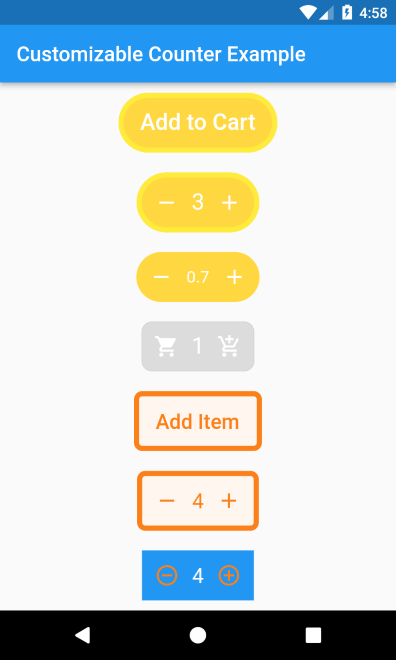
a counter widget that support different kinds of customization.
Customizable Counter
A counter widget that support different kinds of customization.
Installation
From pubspec.yaml
Add the following line to pubspec.yaml:
dependencies:
  customizable_counter: <last-release>
and
flutter pub get
From cli
run following command:
flutter pub add customizable_counter
Basic setup
Complete example available here.
@override
Widget build(BuildContext context) =>
    CustomizableCounter(
      borderColor: Colors.yellow,
      borderWidth: 5,
      borderRadius: 100,
      backgroundColor: Colors.amberAccent,
      buttonText: "Add Item",
      textColor: Colors.white,
      textSize: 22,
      count: 0,
      step: 1,
      minCount: 0,
      maxCount: 10,
      incrementIcon: const Icon(
        Icons.add,
        color: Colors.white,
      ),
      decrementIcon: const Icon(
        Icons.remove,
        color: Colors.white,
      ),
      onCountChange: (count) {

      },
      onIncrement: (count) {

      },
      onDecrement: (count) {

      },
    );
Parameters
In order to customize the widget ui there are several attributes that are supported by this package:
| Attribute | Type | Default | Required | Description |
|---|---|---|---|---|
borderColor | Color | null | No | color of widget border |
borderWidth | double | null | No | width of widget border |
borderRadius | double | null | No | radius of widget border |
backgroundColor | Color | null | No | color of widget background |
buttonText | String | null | No | text that will shown on widget if counter value is zero. |
textColor | Color | null | No | button title and counter text color |
textSize | double | null | No | button title and counter text size |
decrementIcon | Widget | null | No | icon widget that will be shown on left side and by clicking this widget the counter value will de decreased. |
incrementIcon | Widget | null | No | icon widget that will be shown on right side and by clicking this widget the counter value will de increased. |
count | double | 0 | No | the current value of the counter. |
maxCount | double | double.maxFinite | No | the maximum value support for counter |
minCount | double | 0 | No | the minimum value support for counter |
step | double | 1 | No | amount increased or decreased after clicking buttons. |
showButtonText | bool | true | No | does shown button text when counter value is zero. |
onCountChange | Function(double c) | null | No | called when the counter value change by clicking button. |
onIncrement | Function(double c) | null | No | called when the counter value increment by clicking Increment button. |
onCountChange | Function(double c) | null | No | called when the counter value decrement by clicking Decrement button. |