el_tooltip 2.2.1
SDKflutter
Platformandroidioswindowslinuxmacosweb
ElTooltip, a smart positioned tooltip. Use it to display a widget inside a tooltip that you can personalize.

ElTooltip - a smart positioned tooltip
Why el_tooltip?
- 📦 Add widget elements to your tooltip
- ↔️ Chose the preferred position for the tooltip to appear relative to the button
- ↩️ The position changes automagically if the desired one doesn't fit the screen
- ✅ No external dependencies
- ❤️ Customizable layout
- 🛡️ Null safety
Getting Started
🍭 Installation
Add to your pubspec.yaml
dependencies:
  el_tooltip: <last_version>
Import the library and call the Widget ElTooltip() with the required fields child and content
import 'package:flutter/material.dart';
import 'package:el_tooltip/el_tooltip.dart';

void main() {
  runApp(MaterialApp(
    title: 'Flutter Demo',
    theme: ThemeData(
      primarySwatch: Colors.blue,
    ),
    home: const SafeArea(
      child: Center(
        child: ElTooltip(
          child: Icon(Icons.info_outline),
          content: Text('This is a tooltip'),
        ),
      ),
    ),
  ));
}
🏷️ El Tooltip widget properties
| Properties | Required | Default | Description |
|---|---|---|---|
| content | true | What will appear inside the tooltip. | |
| child | true | Widget that represent the button to activate the tooltip (no click method required). | |
| color | false | Colors.white | Background color of the bubble and the arrow. |
| distance | false | 10.0 | Space between the child button and the tooltip. |
| padding | false | EdgeInsets.all(14.0) | Tooltip padding around the content widget. |
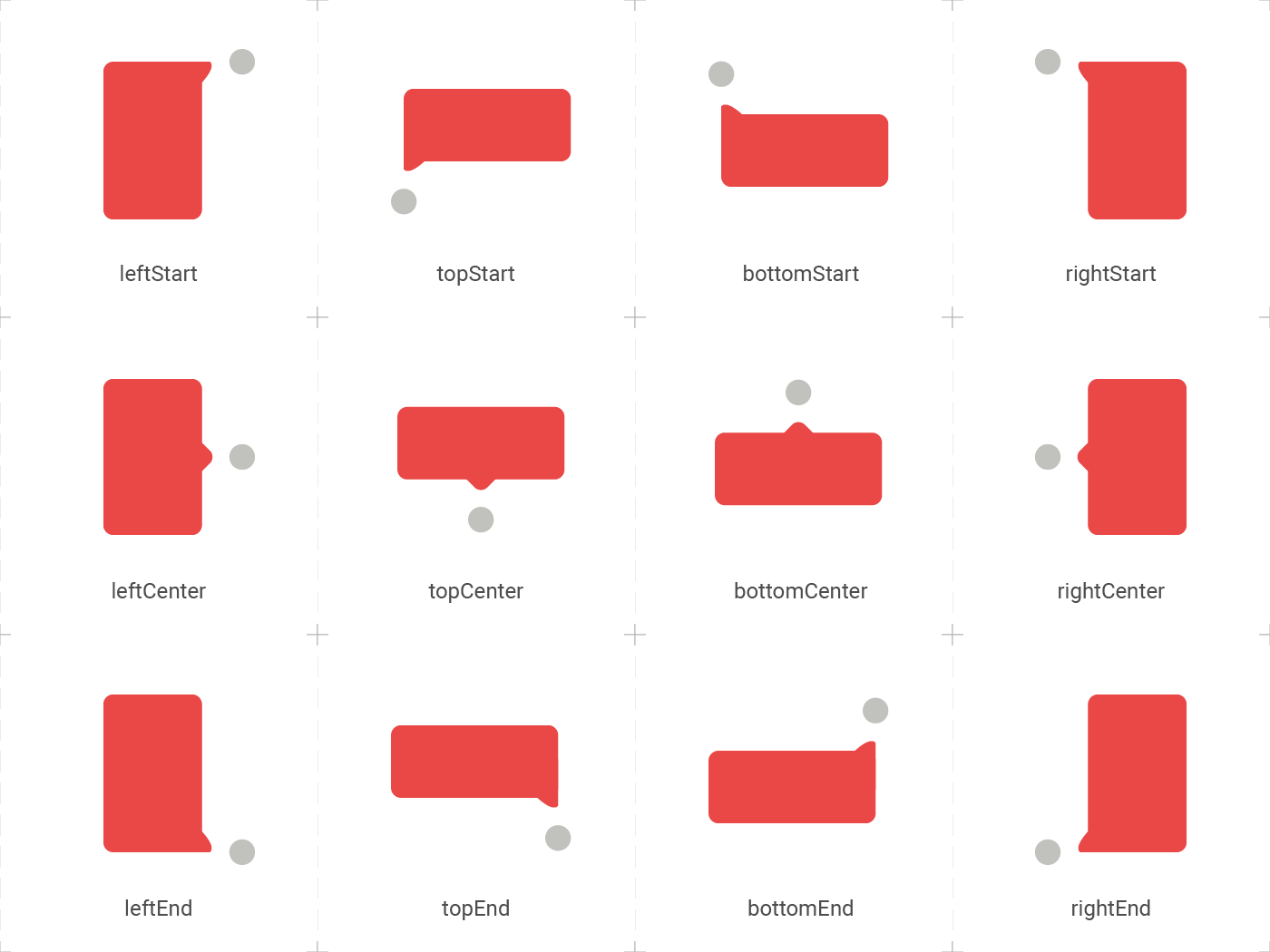
| position | false | topCenter | Desired position based on the Enum ElTooltipPosition. Can be topStart, topCenter, topEnd, rightStart, rightCenter, rightEnd, bottomStart, bottomCenter, bottomEnd, leftStart, leftCenter, leftEnd, |
| radius | false | Radius.circular(8.0) | Border radius of the tooltip. |
| showModal | false | true | Displays a fullscreen dark layer behind the tooltip. |
| showArrow | false | true | Displays the arrow pointing to the child widget. |
| showChildAboveOverlay | false | true | Repeats the child above the tooltip overlay. |
| modalConfiguration | false | ModalConfiguration() | Configures the modal color and opacity if showModal is true. |
| timeout | false | Duration.zero (only disappears on click) | How many time to wait for the tooltip to disappear. |
| appearAnimationDuration | false | Duration.zero (does not animate) | Fade In animation duration. |
| disappearAnimationDuration | false | Duration.zero (does not animate) | Fade Out animation duration. |
| controller | false | null | ElTooltipController to show and hide the tooltip. |
↔️ El Tooltip available positions
El tooltip header image was created using macrovector illustration on Freepik
Contributors ✨
Thanks goes to these wonderful people:
Marcelo Gil 💻 | Matteo Pietro Dazzi 💻 | Grzegorz Leoniec 💻 |


