flashing_widget 1.0.0
A customizable Flutter widget that creates a flashing animation effect before executing a callback function.
Flashing Widget
A customizable Flutter widget that creates a flashing animation effect before executing a callback function.
Developer
Developer: Talha Javed | GitHub: @talhajaved
🎥 Demo
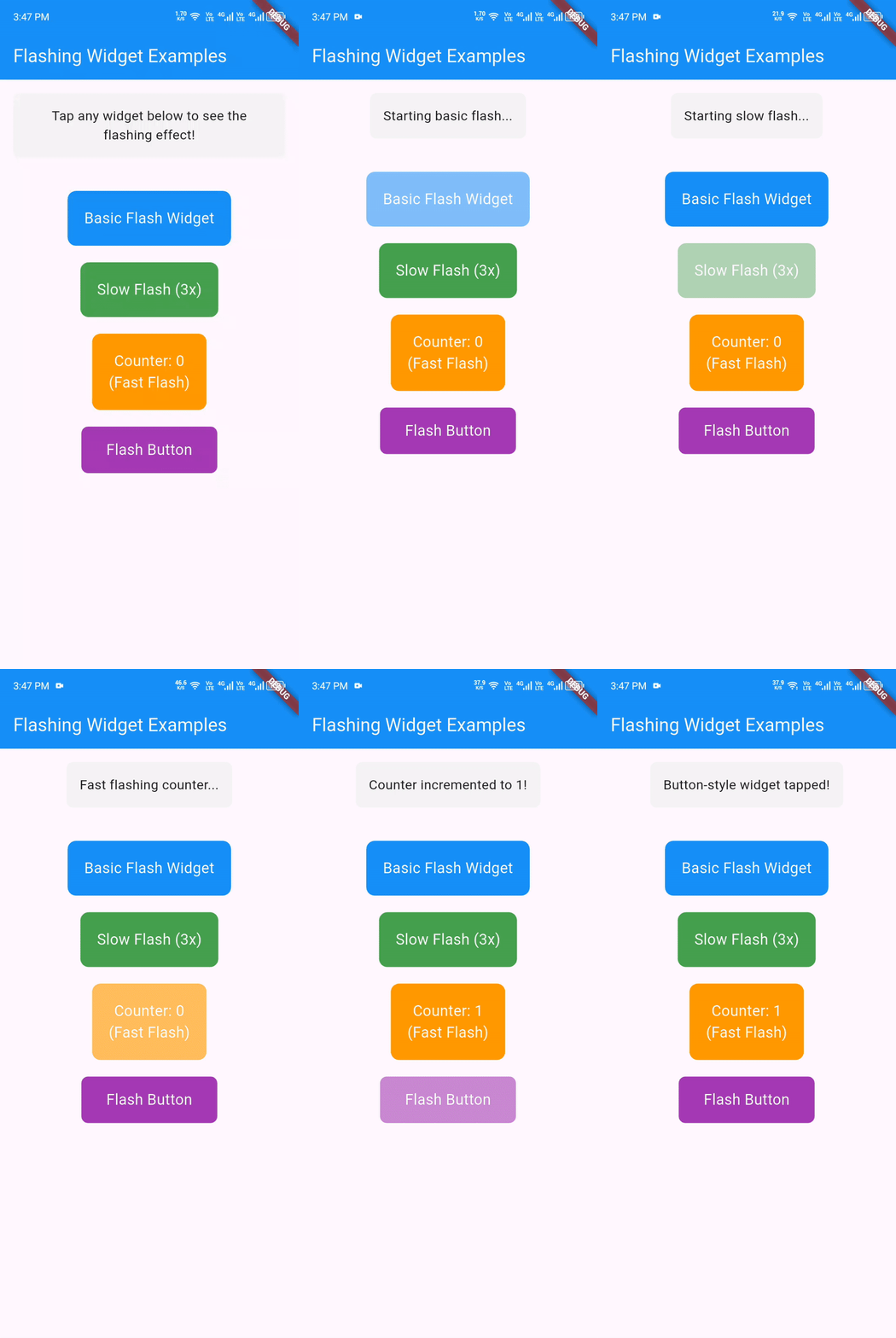
Tap any widget to see the flashing animation in action!
Features
- 🔥 Smooth flashing animation
- ⚙️ Customizable flash duration and count
- 🎯 Callback support before and after flashing
- 🛡️ Built-in gesture detection
- 📱 Lightweight and performant
- 🔄 Backward compatibility support
Installation
Add this to your package's pubspec.yaml file:
dependencies:
  flashing_widget: ^1.0.0
Then run:
flutter pub get
Getting Started
Step 1: Import the package
import 'package:flashing_widget/flashing_widget.dart';
Step 2: Wrap your widget
FlashingWidget(
  onTap: () {
    // Your action here
    print('Flash completed!');
  },
  child: YourWidget(),
)
Step 3: Customize (optional)
FlashingWidget(
  flashDuration: Duration(milliseconds: 150),
  flashCount: 3,
  beforeFlashing: () => print('Starting...'),
  onTap: () => print('Done!'),
  child: YourWidget(),
)
Usage Examples
Basic Example
import 'package:flutter/material.dart';
import 'package:flashing_widget/flashing_widget.dart';

class MyApp extends StatelessWidget {
  @override
  Widget build(BuildContext context) {
    return MaterialApp(
      home: Scaffold(
        appBar: AppBar(title: Text('Flashing Widget Example')),
        body: Center(
          child: FlashingWidget(
            onTap: () {
              print('Flashing animation completed!');
              // Your action here - navigation, API call, etc.
            },
            child: Container(
              padding: EdgeInsets.all(20),
              decoration: BoxDecoration(
                color: Colors.blue,
                borderRadius: BorderRadius.circular(10),
              ),
              child: Text(
                'Tap me!',
                style: TextStyle(color: Colors.white, fontSize: 18),
              ),
            ),
          ),
        ),
      ),
    );
  }
}
Advanced Customization
FlashingWidget(
  // Customize flash timing
  flashDuration: Duration(milliseconds: 150),
  flashCount: 3,
  animationDuration: Duration(milliseconds: 300),

  // Add callbacks
  beforeFlashing: () {
    print('Starting flash animation...');
    // Show loading indicator, disable other buttons, etc.
  },
  onTap: () {
    print('Animation complete! Executing action...');
    // Your main action here
  },

  child: ElevatedButton(
    onPressed: null, // Disable button's own onPressed
    child: Text('Custom Flash Button'),
  ),
)
Common Use Cases
1. Navigation with Visual Feedback
FlashingWidget(
  onTap: () {
    Navigator.push(
      context,
      MaterialPageRoute(builder: (context) => NextScreen()),
    );
  },
  child: ListTile(
    leading: Icon(Icons.arrow_forward),
    title: Text('Navigate to Next Screen'),
  ),
)
2. Form Submission
FlashingWidget(
  beforeFlashing: () {
    // Disable form, show loading state
    setState(() => isLoading = true);
  },
  onTap: () async {
    // Submit form
    await submitForm();
    setState(() => isLoading = false);
  },
  child: Container(
    padding: EdgeInsets.symmetric(vertical: 12, horizontal: 24),
    decoration: BoxDecoration(
      color: Colors.green,
      borderRadius: BorderRadius.circular(8),
    ),
    child: Text('Submit Form', style: TextStyle(color: Colors.white)),
  ),
)
3. Game Actions
FlashingWidget(
  flashDuration: Duration(milliseconds: 50),
  flashCount: 8,
  onTap: () {
    // Trigger game action
    player.attack();
    updateScore();
  },
  child: Container(
    width: 100,
    height: 100,
    decoration: BoxDecoration(
      color: Colors.red,
      shape: BoxShape.circle,
    ),
    child: Icon(Icons.touch_app, color: Colors.white, size: 40),
  ),
)
4. API Calls with Visual Feedback
FlashingWidget(
  flashCount: 3,
  beforeFlashing: () {
    showSnackBar('Processing request...');
  },
  onTap: () async {
    try {
      final result = await apiService.getData();
      showSnackBar('Success: ${result.message}');
    } catch (e) {
      showSnackBar('Error: $e');
    }
  },
  child: Card(
    child: Padding(
      padding: EdgeInsets.all(16),
      child: Column(
        children: [
          Icon(Icons.cloud_download),
          Text('Fetch Data'),
        ],
      ),
    ),
  ),
)
API Reference
FlashingWidget Parameters
| Parameter | Type | Default | Description |
|---|---|---|---|
child | Widget | required | The widget to wrap and animate |
onTap | VoidCallback | required | Callback executed after flashing completes |
beforeFlashing | VoidCallback? | null | Optional callback executed before flashing starts |
flashDuration | Duration | Duration(milliseconds: 100) | Duration of each flash cycle |
flashCount | int | 5 | Number of flashes before calling onTap |
animationDuration | Duration | Duration(milliseconds: 200) | Duration of the opacity animation |
How It Works
- User taps the wrapped widget
- beforeFlashing callback is called (if provided)
- Flashing animation starts - widget opacity alternates between 0.0 and 1.0
- After specified flash count, animation stops
- onTap callback is executed
Performance Notes
- The widget uses
AnimatedOpacityfor smooth animations - Timer is properly disposed to prevent memory leaks
- Widget checks
mountedstate before updates to avoid errors - Gesture detection is disabled during flashing to prevent multiple triggers
Migration Guide
From v0.x to v1.0
If you were using the deprecated FlashingWidgetScreen:
// Old (deprecated)
FlashingWidgetScreen(
  onTap: () => print('Tapped'),
  child: MyWidget(),
)

// New (recommended)
FlashingWidget(
  onTap: () => print('Tapped'),
  child: MyWidget(),
)
The API is identical, only the class name changed.
Troubleshooting
Common Issues
Q: The widget doesn't respond to taps
- Ensure your child widget doesn't have its own
GestureDetectorthat's consuming the tap events - If using buttons, set their
onPressedtonull
Q: Animation feels choppy
- Try adjusting
flashDuration- 50-200ms usually works best - Reduce
flashCountfor faster completion
Q: Multiple taps trigger multiple animations
- This is prevented by design - the widget ignores taps during flashing
- If you need different behavior, consider using
beforeFlashingto manage state
Best Practices
- Use shorter
flashDuration(50-100ms) for game-like interactions - Use longer
flashDuration(150-300ms) for form submissions or important actions - Keep
flashCountbetween 2-8 for best user experience - Always provide meaningful feedback in your
onTapcallback - Use
beforeFlashingfor immediate UI updates (loading states, etc.)
Examples
Check out the example app for more detailed implementations and interactive demos.
To run the example:
git clone https://github.com/tjbaba/flashing_widget.git
cd flashing_widget/example
flutter run
License
This project is licensed under the MIT License - see the LICENSE file for details.
Made with ❤️ for the Flutter community