lintme 1.0.0%2B2
Software analytics tool that helps developers analyse and improve software quality.




Note: you can find the full documentation on the website
Configuration | Rules | Metrics | Anti-patterns
Lintme is a toolkit that helps you identify and fix problems in your Dart and Flutter code. These problems can range from potential runtime bugs and violations of best practices to styling issues. includes over 70 built-in rules to validate your code against various expectations, and you can customize these rules to fit your specific needs.
- Reports code metrics
- Provides additional rules for the dart analyzer
- Checks for anti-patterns
- Checks unused
*.dartfiles - Checks unused l10n
- Checks unnecessary nullable parameters
- Can be used as CLI and the analyzer plugin
Links
- See CHANGELOG.md for major/breaking updates, and releases for a detailed version history.
- To contribute, please read CONTRIBUTING.md first.
- Please open an issue if anything is missing or unclear in this documentation.
Installation
$ dart pub add --dev lintme

# or for a Flutter package
$ flutter pub add --dev lintme
Basic configuration
Add configuration to analysis_options.yaml and reload IDE to allow the analyzer to discover the plugin config.
You can read more about the configuration on the website.
Basic config example
analyzer:
  plugins:
    - lintme

lintme:
  rules:
    - avoid-dynamic
    - avoid-passing-async-when-sync-expected
    - avoid-redundant-async
    - avoid-unnecessary-type-assertions
    - avoid-unnecessary-type-casts
    - avoid-unrelated-type-assertions
    - avoid-unused-parameters
    - avoid-nested-conditional-expressions
    - newline-before-return
    - no-boolean-literal-compare
    - no-empty-block
    - prefer-trailing-comma
    - prefer-conditional-expressions
    - no-equal-then-else
    - prefer-moving-to-variable
    - prefer-match-file-name
Basic config with metrics
analyzer:
  plugins:
    - lintme

lintme:
  metrics:
    cyclomatic-complexity: 20
    number-of-parameters: 4
    maximum-nesting-level: 5
  metrics-exclude:
    - test/**
  rules:
    - avoid-dynamic
    - avoid-passing-async-when-sync-expected
    - avoid-redundant-async
    - avoid-unnecessary-type-assertions
    - avoid-unnecessary-type-casts
    - avoid-unrelated-type-assertions
    - avoid-unused-parameters
    - avoid-nested-conditional-expressions
    - newline-before-return
    - no-boolean-literal-compare
    - no-empty-block
    - prefer-trailing-comma
    - prefer-conditional-expressions
    - no-equal-then-else
    - prefer-moving-to-variable
    - prefer-match-file-name
Usage
Analyzer plugin
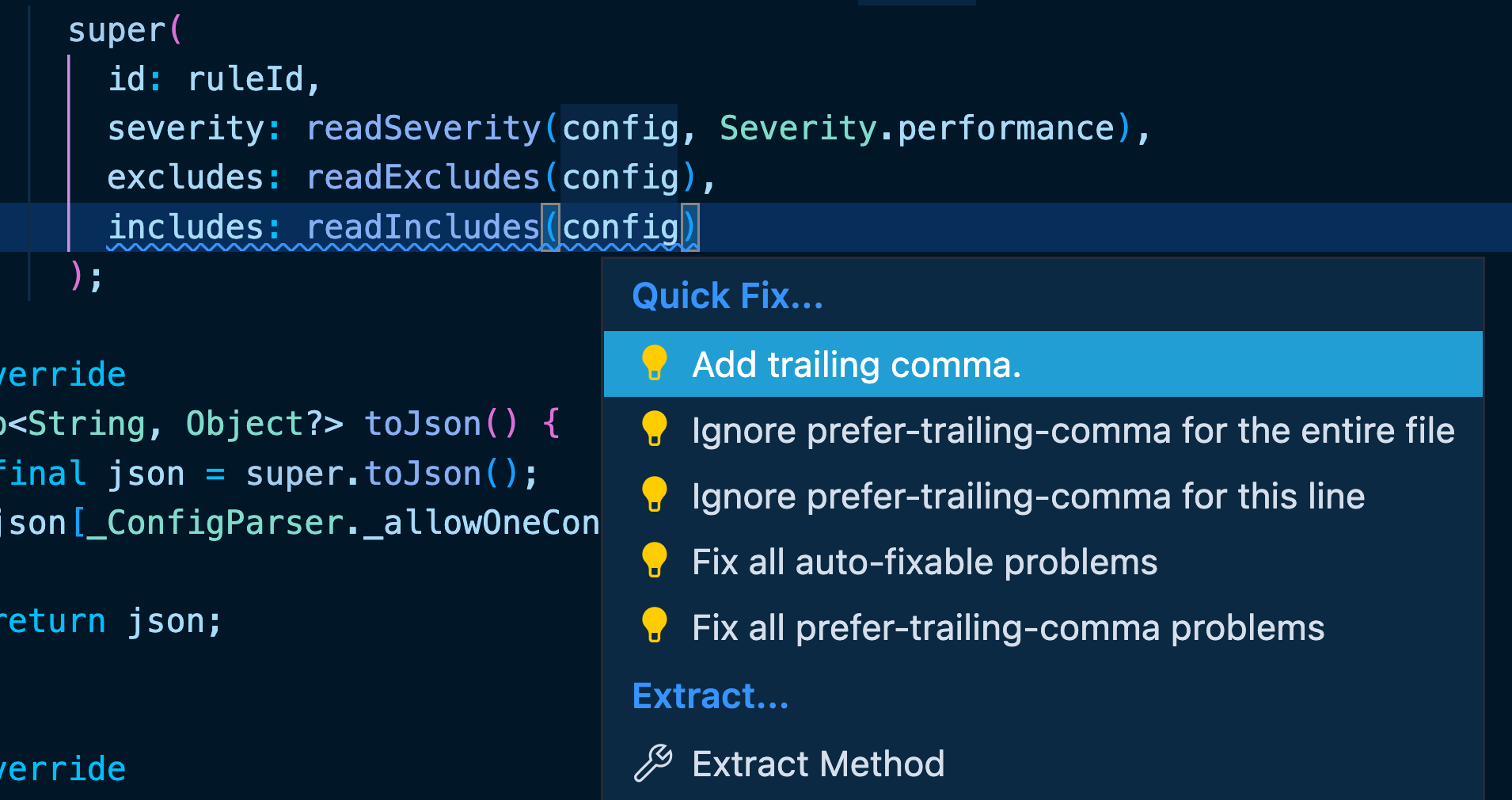
can be used as a plugin for the Dart analyzer package providing additional rules. All issues produced by rules or anti-patterns will be highlighted in IDE.
Rules that marked with 🛠 have auto-fixes available through the IDE context menu. VS Code example:
CLI
The package can be used as CLI and supports multiple commands:
| Command | Example of use | Short description |
|---|---|---|
| analyze | dart run lintme:metrics analyze lib | Reports code metrics, rules and anti-patterns violations. |
| check-unnecessary-nullable | dart run lintme:metrics check-unnecessary-nullable lib | Checks unnecessary nullable parameters in functions, methods, constructors. |
| check-unused-files | dart run lintme:metrics check-unused-files lib | Checks unused *.dart files. |
| check-unused-l10n | dart run lintme:metrics check-unused-l10n lib | Check unused localization in *.dart files. |
| check-unused-code | dart run lintme:metrics check-unused-code lib | Checks unused code in *.dart files. |
For additional help on any of the commands, enter dart run lintme:metrics help <command>
Note: if you're setting up for multi-package repository, check out this website section.
Analyze
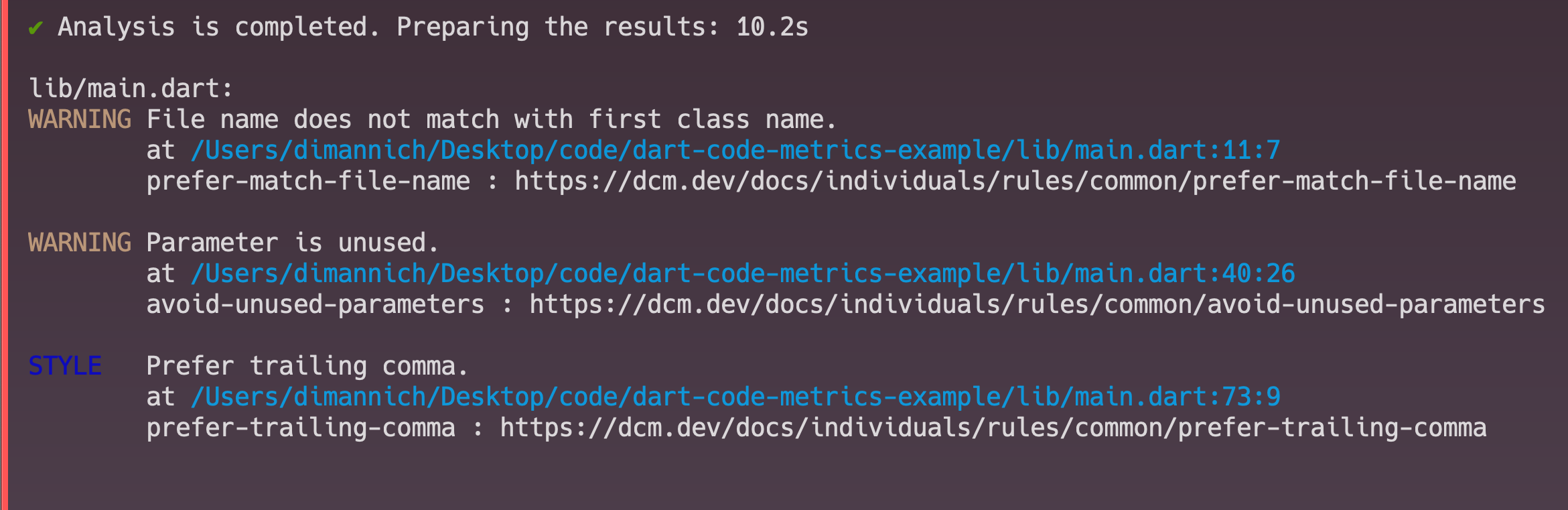
Reports code metrics, rules and anti-patterns violations. To execute the command, run
$ dart run lintme:metrics analyze lib

# or for a Flutter package
$ flutter pub run lintme:metrics analyze lib
It will produce a result in one of the format:
- Console
- GitHub
- Codeclimate
- HTML
- JSON
Console report example:
Check unnecessary nullable parameters
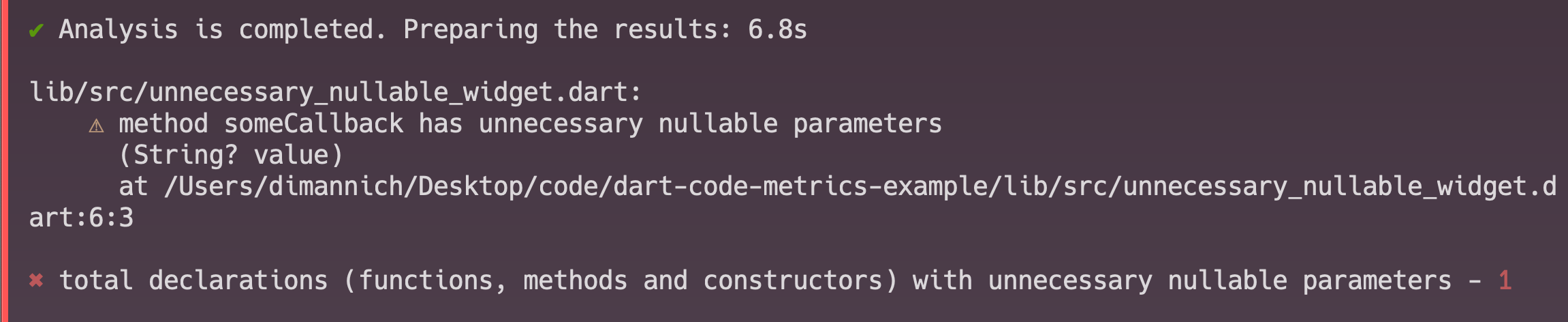
Checks unnecessary nullable parameters in functions, methods, constructors. To execute the command, run
$ dart run lintme:metrics check-unnecessary-nullable lib

# or for a Flutter package
$ flutter pub run lintme:metrics check-unnecessary-nullable lib
It will produce a result in one of the format:
- Console
- JSON
Console report example:
Check unused files
Checks unused *.dart files. To execute the command, run
$ dart run lintme:metrics check-unused-files lib

# or for a Flutter package
$ flutter pub run lintme:metrics check-unused-files lib
It will produce a result in one of the format:
- Console
- JSON
Console report example:

Check unused localization
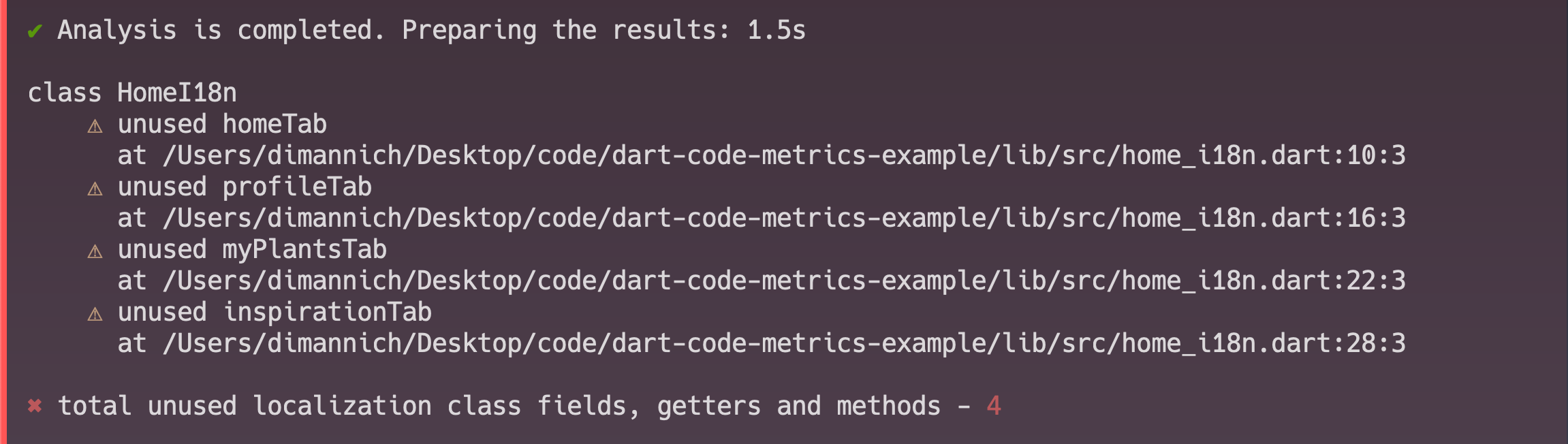
Checks unused Dart class members, that encapsulates the app’s localized values.
An example of such class:
class ClassWithLocalization {
  String get title {
    return Intl.message(
      'Hello World',
      name: 'title',
      desc: 'Title for the Demo application',
      locale: localeName,
    );
  }
}
To execute the command, run
$ dart run lintme:metrics check-unused-l10n lib

# or for a Flutter package
$ flutter pub run lintme:metrics check-unused-l10n lib
It will produce a result in one of the format:
- Console
- JSON
Console report example:
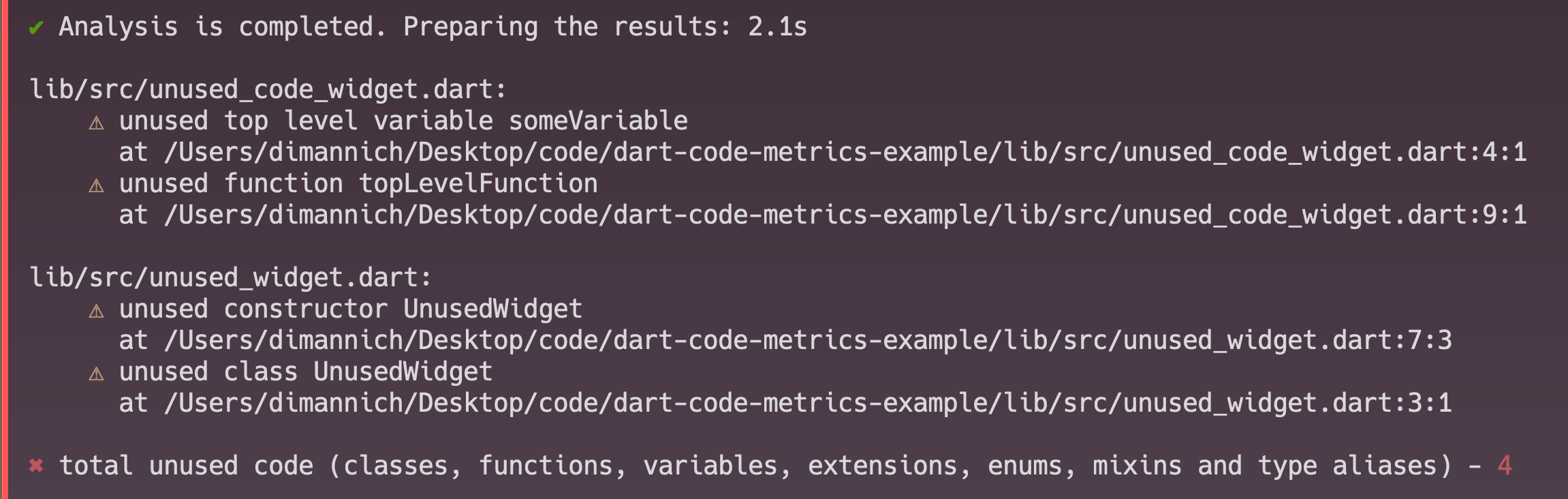
Check unused code
Checks unused code in *.dart files. To execute the command, run
$ dart run lintme:metrics check-unused-code lib

# or for a Flutter package
$ flutter pub run lintme:metrics check-unused-code lib
It will produce a result in one of the format:
- Console
- JSON
Console report example:
Troubleshooting
Please read the following guide if the plugin is not working as you'd expect it to work.
Contributing
If you are interested in contributing, please check out the contribution guidelines. Feedback and contributions are welcome!
Articles
En
- What’s new in for Teams 1.3.0
- What’s new in for Teams 1.2.0
- What’s new in for Teams 1.1.0
- Announcing for Teams
- Finding Unused Files With - This article considers one of the first commands, checking unused Dart files, by Dmitry Zhifarsky
- Improving Code Quality With - Advantages of using , by Dmitry Zhifarsky
- Creating a Custom Plugin for Dart Analyzer - How to develop a custom Dart code analyzer plugin, by Dmitry Zhifarsky
- Flutter Static Analysis, - How to install the dart_code-metrics plugin and effectively use it to analyze dart code, by Fred Grott
Ru
- Повышаем качество кода с - Преимущества использования , от Dmitry Zhifarsky
- Как создать кастомный плагин для Dart-анализатора - Описан процесс создания плагина для анализатора кода, от Dmitry Zhifarsky
- — мой первый pull request - Инструкция по созданию нового правила, от Vlad Konoshenko
How to reach us
Please feel free to ask any questions about this tool. Join our community chat on Telegram. We speak both English and Russian.