mirrorfly_plugin 1.8.0
A MirrorFly Chat to Experience an outstanding real time messaging solution. The powerful communication that adds an extra mileage to build your chat app.
Mirrofly Plugin for Flutter


Table of contents
Introduction
Customizable, Low-code Chat & Video Call Flutter Sample App For Android
MirrorFly Flutter Plugin is a robust tool designed for developers to integrate real-time communication features into mobile apps using Flutter, within 10 mins. It allows you to add over 1000+ messaging and calling functionalities, including in-app messaging, HD video calls, and voice calling, all customizable to fit your brand requirements. The solution is well-known for its plug and play features, where you’ll need no coding experience to build the app. You’ll just pick and place the features and functionalities, saving a lot of time and effort. Plus, you can seamlessly incorporate your company logo, brand colors, and other elements into your Flutter chat app and give a branded look to your platform.
⚒️ Key Product Offerings
MirrorFly Flutter Chat Plugin allows you to add the following capabilities to your platform.
- 💬 In-app Messaging - real-time chat features for private or group interactions
- 📹 HD Video Calling - High-definition video calling for face to face conversations
- 🔊 HQ Voice Calling - Crystal-clear audio calling for voice calling experiences
- 📺 Live Streaming - Broadcasting functionality to take content to millions of audience.
You can also add 1000+ real-time communication capabilities. Check out our other offerings here.
☁️ Deployment Models - Self-hosted and Cloud
MirrorFly offers full freedom with the hosting options:
-
Self-hosted: Host your Flutter client app on your own data centers, private cloud servers or third-party servers. Check out our multi-tenant cloud hosting
-
Cloud: Deploy your Flutter client platform on MirrorFly’s multi-tenant cloud servers. Check out our multi-tenant cloud hosting
📱 Mobile Client
MirrorFly offers a fully-built client SafeTalk that is available in:


You can use this client as a messaging app, or customize, rebrand & white-label it as your chat client.
📺 Video Tutorial
If you’d like to learn the full integration steps as a video, Watch here
Steps To Build A Chat App With Flutter Plugin
Prerequisites
The requirements for Android
- Android Lollipop 5.0 (API Level 21) or above
- Java 17 or higher
- Gradle 8.6.0 or higher
- Kotlin 2.0.20 or higher
- targetSdkVersion,compileSdk 35
The minimum requirements for iOS
- iOS 13.0 or later
The minimum requirements for Mirrorfly Plugin for Flutter are:
- Dart 2.19.2 or above
- Flutter 2.0.0 or higher
Getting Started
The first step in building a Flutter app with MirrorFly is to obtain a License Key. This key is necessary to authenticate the SDK with the server.
To get this License Key,
- Contact our experts
- Get the solution and License Key
Create Android dependency
- Add the following to your root
build.gradlefile in your Android folder.
   allprojects {
    repositories {
        google()
        mavenCentral()
        jcenter()
        maven {
            url "https://repo.mirrorfly.com/release"
        }
    }
  }
Create iOS dependency
- Check and Add the following code at end of your
ios/Podfile
post_install do |installer|
  installer.aggregate_targets.each do |target|
           target.xcconfigs.each do |variant, xcconfig|
           xcconfig_path = target.client_root + target.xcconfig_relative_path(variant)
           IO.write(xcconfig_path, IO.read(xcconfig_path).gsub("DT_TOOLCHAIN_DIR", "TOOLCHAIN_DIR"))
           end
       end

  installer.pods_project.targets.each do |target|
    flutter_additional_ios_build_settings(target)
    target.build_configurations.each do |config|
      config.build_settings['IPHONEOS_DEPLOYMENT_TARGET'] = '13.0'
      config.build_settings['ENABLE_BITCODE'] = 'NO'
      config.build_settings['APPLICATION_EXTENSION_API_ONLY'] = 'No'
      config.build_settings['BUILD_LIBRARY_FOR_DISTRIBUTION'] = 'YES'
      config.build_settings["EXCLUDED_ARCHS[sdk=iphonesimulator*]"] = 'arm64'

      shell_script_path = "Pods/Target Support Files/#{target.name}/#{target.name}-frameworks.sh"
            if File::exist?(shell_script_path)
              shell_script_input_lines = File.readlines(shell_script_path)
              shell_script_output_lines = shell_script_input_lines.map { |line| line.sub("source=\"$(readlink \"${source}\")\"", "source=\"$(readlink -f \"${source}\")\"") }
              File.open(shell_script_path, 'w') do |f|
                shell_script_output_lines.each do |line|
                  f.write line
                end
              end
            end
     end
  end
end
- Now, enable the below mentioned capabilities into your project by opening
iosfolder usingXcode.
Goto Project -> Target -> Signing & Capabilities -> Click `+ Capability` at the top left corner -> Search for `App groups` and add the `App group capability`
Note: The App Group Must be same as
iOSContainerIdgiven during the SDK Initialization. See Initialization Step 1.
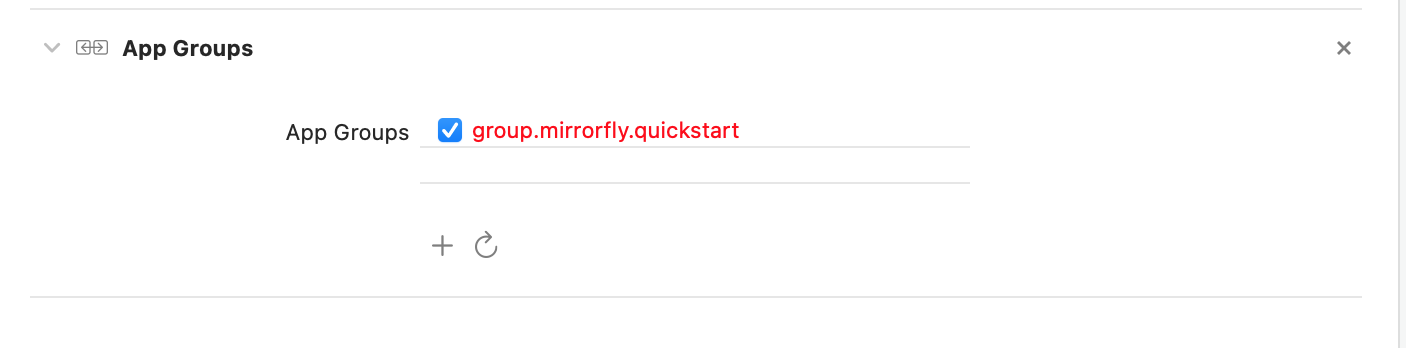
Create Flutter dependency
- Add following dependency in
pubspec.yaml.
dependencies:
  mirrorfly_plugin: ^1.8.0
- Run
flutter pub getcommand in your project directory. You can access all classes and methods with the following import statement:
import 'package:mirrorfly_plugin/mirrorfly.dart';
Initialize the MirrorFly Plugin
To initialize the plugin, add the following code to your main.dart file inside the main function, before calling runApp().
void main() {
  WidgetsFlutterBinding.ensureInitialized();
  Mirrorfly.initializeSDK(
      licenseKey: 'your license key',
      iOSContainerID: 'your app group id',
      chatHistoryEnable: false, // true to enable chat history, default is false
      enablePrivateStorage: false, // true to enable private storage, default is false
      flyCallback: (FlyResponse response) {
        if (response.isSuccess) {
          LogMessage.d("onSuccess", response.message);
        } else {
          LogMessage.d("onFailure", response.exception?.message.toString());
        }
        runApp(const MyApp());
      });
}
Step 2: Login
Use the below method to login a user in sandbox Live mode.
Mirrorfly.login(userIdentifier,flyCallback: (FlyResponse response) {
    // you will get the user registration response
    if (response.isSuccess && response.hasData) {
        var userData = registerModelFromJson(response.data); //message

    } else {
      // Register user failed print throwable to find the exception details.
        if (response.exception?.code == "403") {
          //admin blocked the user
        } else if (response.exception?.code  == "405") {
          //maximum device limit reached
        }
    }
});
Important Note
-
Login Method Usage:
Do not call theloginmethod more than once in the application unless you explicitly log out the session. -
FCM Token (Optional):
During login, theloginmethod can accept an optionalFCM_TOKENparameter and pass it across. The connection will be established automatically upon completing the login process. For new users, theloginmethod will also handle registration. -
Update Profile After Registration:
After registering, make sure to update the profile of the registered user. Refer to the Update Profile documentation. -
Re-login Requirement:
Re-login is required if theonLoggedOutevent is triggered. -
Backup Restrictions:
If your app contains sensitive data, it is recommended to disallow app backups. Whenandroid:allowBackup="true", it becomes possible to modify or read the app's content even on non-rooted devices. -
Session Management Caution:
- If
FORCE_REGISTERis set tofalseand the maximum number of multi-sessions has been reached, registration will fail with a 405 exception. - To proceed, you must either set
FORCE_REGISTERtotrueor log out one of the existing sessions.
- If
Send a One-to-One Message
Use the below method to send a text message to other user,
Note: To generate a unique user jid by
username, you must call the below method
To get JID of User
var userJid = await Mirrorfly.getJid(username: username);
To get Group JID
var groupJid = await Mirrorfly.getGroupJid(groupId: groupID);
To send a Message
Mirrorfly.sendMessage(messageParams: MessageParams.Text(toJid: "",
    replyMessageId: "",textMessageParams: TextMessageParams(messageText: "Hi")), flyCallback: (response){
    if(response.isSuccess){
        var chatMessage = sendMessageModelFromJson(response.data);
        print('Message sent successfully');
     } else {
       print('Failed to send message: ${response.errorMessage}');
     }
});
Receive a One-to-One Message
The listeners will only be triggered when a new message is received from another user. For more details, please refer to the callback listeners
Mirrorfly.onMessageReceived.listen(result){
    // you will get the new messages
    var chatMessage = sendMessageModelFromJson(result)
}
Call Feature
Note: To enable the Call Feature in iOS, need to enable VOIP as shown below.

To make a Video Call
Mirrorfly.makeVideoCall(toUserJid: userJID,flyCallBack: (FlyResponse response) {
    if (response.isSuccess) {

    } else {

    }
});
To make a Voice Call
Mirrorfly.makeVoiceCall(toUserJid: userJID,flyCallBack: (FlyResponse response) {
    if (response.isSuccess) {

    } else {

    }
});
Note: Provide Microphone and Camera permission and usage description in the iOS plist and Android Manifest file of your project.
To make a Group Voice Call
Mirrorfly.makeGroupVoiceCall(groupJid: GROUP_ID, toUserJidList: USER_LIST,flyCallBack: (FlyResponse response) {
    if (response.isSuccess) {

    } else {

    }
});
To make a Group Video Call
Mirrorfly.makeGroupVideoCall(groupJid: GROUP_ID, toUserJidList: USER_LIST,flyCallBack: (FlyResponse response) {
    if (response.isSuccess) {

    } else {

    }
});
Try the sample app
The fastest way to test Mirrorfly Plugin for Flutter is to build your chat app on top of our sample app. To create a project for the sample app, download the app from our GitHub repository. The link is down below.
🤝Getting Help
If you need any further help with our Flutter Chat Plugin, check out our resources
If you need any help in resolving any issues or have questions, Drop a mail to integration@contus.in.
📚 Learn More
- Developer Documentation
- Product Tutorials
- Dart Documentation
- Pubdev Documentation
- Npmjs Documentation
- On-premise Deployment
- See who's using MirrorFly
🧑💻 Hire Experts
Need a tech team to develop your enterprise app in Flutter? Hire experienced professionals who will handle everything from concept to launch, delivering a high-quality app that’s expertly crafted and ready to go.
⏱️ Round-the-clock Support
If you need assistance with our solution, don’t hesitate to reach out to our experts, available 24/7 to help you.
💼 Become a Part of our amazing team
We're always on the lookout for talented developers, support specialists, and product managers. Visit our careers page to explore current opportunities.