picker_pro_max_ultra 2.0.15
Advanced media picker for Flutter with support for images, videos, camera capture, documents, and multi-selection.
Project Title
A brief description of what this project does and who it's for
📦 picker_pro_max_ultra

A powerful and customizable media picker for Flutter, built with performance and ease of use in mind.
Easily pick images , file and videos from device storage or capture new ones with camera support. Comes with advanced features like folder browsing, multi-selection, capture image from camera, and custom UI also allow to pick file.
| Feature | Android | iOS | Web | Windows | macOS | Linux |
|---|---|---|---|---|---|---|
| Image Picker | ✅ | ✅ | ✅ | ❌ | ❌ | ❌ |
| Video Picker | ✅ | ✅ | ✅ | ❌ | ❌ | ❌ |
| Document Picker | ✅ | ✅ | ✅ | ❌ | ❌ | ❌ |
| Audio Picker | ✅ | ❌ | ✅ | ❌ | ❌ | ❌ |
| Camera (Capture) | ✅ | ✅ | ❌ | ❌ | ❌ | ❌ |
✨ Features
- 📸 Capture image & video using the camera
- 🖼 Pick images & videos from the gallery
- 📂 Folder-based media browsing
- 🔁 Multi-selection support
- 📁 File pick support
- 🎵 Audio picker (Android only)
- ⚡ Fast loading with optimized performance
🛠 Installation
Add this to your pubspec.yaml:
dependencies:
  picker_pro_max_ultra: ^<latest_version>
Replace <latest_version> with the latest version
on pub.dev.
⚙️ Setup
📝 Note
Permission handling (e.g. for accessing media, storage, or camera) must be implemented from the Flutter side using packages like
permission_handleror through manual platform configuration.This plugin does not request or manage permissions internally.
✅ Android
Add the following permissions to
your AndroidManifest.xml (android/app/src/main/AndroidManifest.xml):
    <!-- Media Access -->
<uses-permission android:name="android.permission.READ_MEDIA_IMAGES" /><uses-permission
android:name="android.permission.READ_MEDIA_VIDEO" /><uses-permission
android:name="android.permission.READ_EXTERNAL_STORAGE"
android:maxSdkVersion="32" /><uses-permission
android:name="android.permission.WRITE_EXTERNAL_STORAGE" /><uses-permission
android:name="android.permission.READ_MEDIA_AUDIO" /><!-- Camera Access -->
<uses-permission android:name="android.permission.CAMERA" />
🍏 iOS
Add the following entries to your ios/Runner/Info.plist:
<key>NSPhotoLibraryUsageDescription</key><string>This app requires access to your photo library.
</string>

<key>NSCameraUsageDescription</key><string>This app requires access to the camera.</string>

<key>NSMicrophoneUsageDescription</key><string>This app requires access to the microphone.</string>
🧪 Example Usage
// Manage theme

  MaterialApp(
    title: 'Media Picker',
    theme: ThemeData(
    primarySwatch: Colors.green,
    extensions: <ThemeExtension<dynamic>>[
        const PickerThemeData(
            bottomSheetBackgroundColor: Colors.black,
            bottomSheetIndicatorColor: Colors.blue,
            tabDisableColor: Colors.grey,
            tabEnableColor: Colors.red,
            doneTextStyle: TextStyle(color: Colors.orange),
            cancelTextStyle: TextStyle(
                 color: Colors.white,fontWeight:FontWeight.bold),
            borderRadius: 10,
         ),
       ],
     ),
   home: const MyHomePage(),
)

// Pick media
// show loader
         MediaPicker(
            context: context,
            maxLimit: 5 ?? 1,
           mediaType: MediaType.image
           ).showPicker()
              .then((file) {
              // hide loader
                  if (file != null) {
                    filePath = file.first.mediaFile!.path;
                      setState(() {});
                     }
                  }).catchError((onError) {
                 // hide loader
                });


// Capture from camera
          MediaPicker(context: context,).
                   capturedFile().
                   then((file){
                    /// hide loader
                    if (file != null) {
                        filePath = file.path;
                        setState(() {});
                     }
                    }).catchError((onError) {
                    /// hide loader
                });


// Pick Document
                MediaPicker(
                   context: context,
                ).picFile().then((file) {
                 /// hide loader
                   if (file != null) {
                    filePath = file.path;
                    setState(() {});
                   }
                }).catchError((onError) {
                /// hide loader
                });
For a full example, check out the example folder. | |
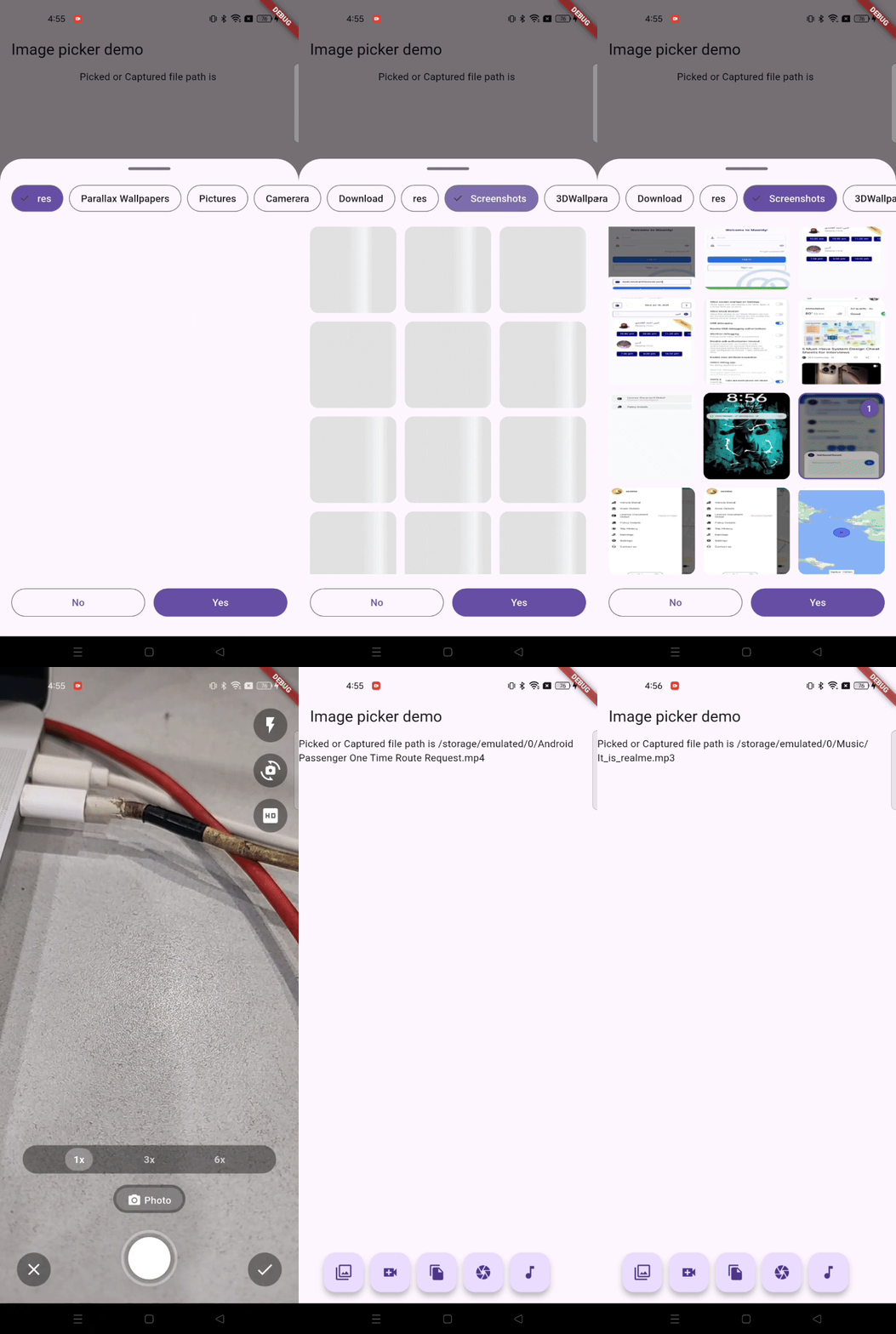
🎥 Demo (Screen Recording)
🧩 Contributions
Contributions, issues, and feature requests are welcome!
Feel free to check issues page.
📄 License
This project is licensed under the MIT License.